
Environmental Health Trust.
Safe tech at home is simpler than it may seem. Yes, wireless radiation, a type of EMF, is everywhere; and yes, we can reduce our exposure. These Twelve Steps To Safe Technology can help you to make safer, healthier choices about wireless transmitting devices such as smart phones, home cordless phones, tablets, laptops, gaming devices, smart meters, and desktop computers. Read on to reduce wireless radiation in your home.
1. Distance Is Your Friend

One basic, very important concept is “Distance Is Your Friend.” The amount of radiation absorbed into the human user decreases very rapidly with distance from whatever wireless device you may be using. Decrease your exposure by increasing your distance from emitting sources. For example, always keep cell phones and wireless laptops away from your body.
2. Identify Sources in Your Home
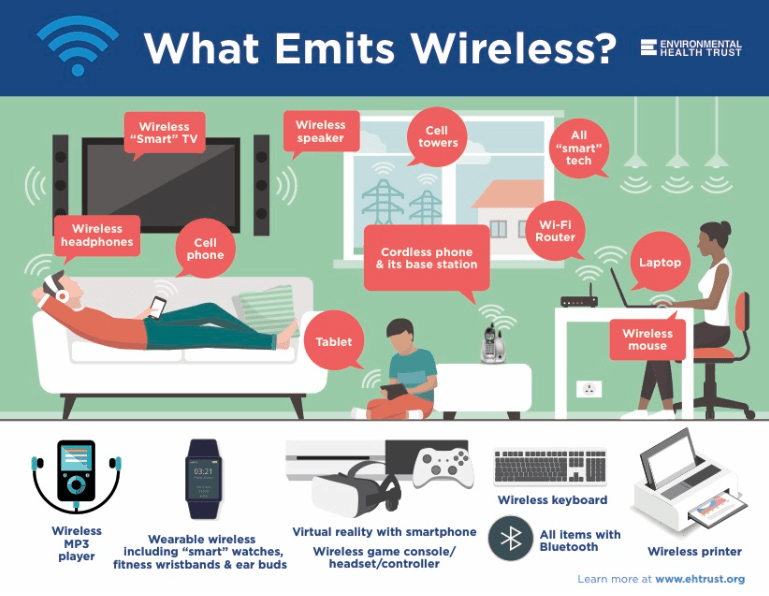
Take a look around your home. How many wireless things do you have? Become aware of the various emitting sources in your surroundings first so you can address each one step by step.
To keep distance from devices, you need to be aware of the various emitting sources in your surroundings—and in some cases to identify safer ways to get the connections you need without wireless radiation.
Some common items that emit wireless include computers, smart speakers, Wi-Fi routers, gaming consoles, cordless phones, cordless mouse, wireless security systems, and of course cell phones.
3. Get To Know Airplane Mode

“Airplane mode”, also known as “flight mode,” is a setting on your wireless device that stops the microwave radiation emissions. It turns antennas to OFF. Learning how to use airplane mode is one of our most important tips. On some devices airplane mode only stops cellular antennas, so you also need to check and turn off other antennas that could be on such as Wi-Fi or Bluetooth.
- On every computer, laptop, tablet, or WTD, there is a function key that turns OFF the Wi-Fi transmitter. There is also a function key that turns OFF the Bluetooth transmissions.
- Whenever you hand a child a technology device such as cell phone, tablet, or laptop, please set the Airplane mode to ON, and Wi-Fi to OFF, and Bluetooth to OFF.
- Devices should be used on a table and never on a lap.
4. Choose Corded Technology Connections
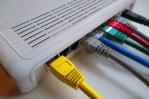
For home phones, internet, printers, speakers, and entertainment gear, connect by cord or cable with all wireless features off.
- Wi-Fi Internet Connections: As an easy first step, power off the Wi-Fi router at bedtime. Then ask your internet provider how to connect with plug-in cords and turn off the antennae feature of the modem or router. Many companies allow you to manage the wireless settings online, and you can simply turn it off via the internet. Other times a swap to a non-wireless modem is necessary.
- Hardwire Game Stations and Controllers: Choose gaming devices that have the option to connect the hand controllers with a cord.
- Hardwire Accessories (Printer, Keyboard, Mouse, Speakers, etc.): Wi-Fi printers are a hidden source of constant Wi-Fi emissions just like a Wi-Fi router or cordless phone base, as is a cordless mouse or a virtual assistant speaker.
Watch a video on how to hardwire your home here:
5. Get a Corded Landline

Trade in your home cordless phones for corded phones. Cordless phones emit radiation like cell phones. Most cordless phone base stations constantly emit high levels of microwave radiation regardless of whether or not any connected handset is in use. Corded landlines have no wireless radiation emissions, so this simple step can substantially reduce your daily microwave radiation exposures.
Use a corded phone for voice conversations at home, and forward cell phones to this line while you are at home. Every home should have a corded landline (the kind with a curly cord to the handset) if possible. If you cannot get a copper landline, you can use a Voice over Internet Protocol system (VOIP) or purchase a telephone line connection from your Internet provider.
6. Turn It Off
We want to be clear: turning things “off when not in use” still results in significant wireless exposure when they are on. EHT recommends you swap out wireless devices with safe wired connections. However, many people feel overwhelmed or are unable to do this immediately. That is why turning things off when not in use is a good first step.
Wireless enabled devices are always transmitting radiation even when you are not surfing the internet or using the device to talk or message. The only way to stop these emissions is to set the wireless antennas to OFF.
Why? Wi-Fi devices continuously check in with their main network (cell tower or Wi-Fi router) to be sure a connection exists. This radiation activity is called a digital handshake. For example, a Wi-Fi router emits a beacon signal at regular intervals to signal the available network (whether or not any person or machine is using the network). Similarly, a Wi-Fi enabled tablet or other personal use devices will also signal at regular intervals hunting for a network (whether or not a person is using that connection). Those signals are all radiation emissions.
- You can easily decrease your family’s radiation exposure by turning off wireless networks and devices when not actively in use, such as at night while you sleep.
- Unplugging wireless devices (and their related gear) when not in use also saves significant energy and makes all around good sense.
- Note: Turning Wi-Fi off when not in use only eliminates wireless exposures while the WiFi is OFF. You will still be exposed when the Wi-Fi is back ON.
7. Power Off Wireless Devices When Driving

Power off wireless connectivity in vehicles. Mobile devices distract drivers even if hands-free. Cell phones and streaming tablets and laptops also emit higher power radiation during travel because the metal surroundings create radiation hotspots inside the driver and passenger areas of your vehicle.
- Use an old fashioned GPS without wireless.
- Plan ahead so that you do not need to use any cell phones or wirelessly enabled devices in the car.
- Going on a road trip and your children want to watch movies? Before you leave, download the movies onto the device so that during the trip wireless access is not necessary.
- Call your car manufacturer to learn how to turn the wireless antennas ( Bluetooth or Wi-Fi) to OFF in the car.
8. Practice Safer Cell Phone Use

Try to minimize your overall cell phone use to decrease the time you are exposed. For adults who must use a mobile phone:
- Use speaker phone or a plug-in earpiece to keep the phone away from your brain and body, and when you are not using the phone be sure to power off or set the phone on Airplane/Flight mode and the Wi-Fi to OFF and the Bluetooth to OFF.
- Prefer texting instead of voice calls and hold the phone out, away from your body when you press “send,” and do not rest your phone against your abdomen as you text.
- Do not carry a powered ON cell phone in your pocket or bra.
- Turn automatic updates off. Reduce active Apps. Cell phones emit radiation constantly, even when you are not actively using them. Even if you turn wireless antennas off, they are still emitting magnetic fields so power them 100% off before you carry them near your body.
- Children should not use mobile phones except for emergencies.
Note: The safest way to use a cell phone is to turn it off and use a corded landline. Environmental Health Trust has a detailed step by step on reducing cell phone radiation here.
9. Safeguard Your Sleep

Pew Research reported that 75% of children sleep every night with their cell phone beneath their pillow. Be aware that wireless radiation and light seriously impact our sleep so be sure to power off all screens and electronics well before bedtime.
- Need an alarm on your phone? You can set the phone to Airplane/Flight Mode ON and the Wi-Fi and Bluetooth to OFF and still use the alarm feature.
- Many newer TVs, gaming systems, and computers plugged into electricity or on battery power will have radiation emissions even if in power off mode, so it is best to remove them from the bedroom or completely disconnect them from their power source.
- Be sure to charge cell phones and tech devices outside the bedroom, because charger gear generates other types of electromagnetic fields that are also linked to health issues.
- Locate screens in family areas—not in bedrooms.
10. Protect Children and Pregnant Women

Rethink how you use cell phones when you are near children. Children’s skulls are thinner than adults’ and their brains are still developing. Radiation from cell phones penetrates more deeply into their brains and is likely to cause more damage. Do not use a cell phone while an infant is on your lap, and do not carry your cell phone in your baby carrier. Keep a transmitting cell phone or wireless device away from a child’s brain and body—both before and after birth.
See also the BabySafe Project and TechSafeSchools
11. Decrease the Power of the Signal
Educate yourself on the situations where your cell phone or wireless device has higher wireless radiation emissions, so you can reduce your use in these situations.
For example, your device will emit more radiation when you are traveling in a moving vehicle, when you are streaming audio or video or downloading large files, when in areas of low reception, and when several applications are open or running in the background on your device.
- Do not stream video inside vehicles. Passengers can use electronics with pre-loaded movies and applications (instead of streaming).
- Prefer to video chat when you are at a computer with a corded internet connection.
- If you want to listen to music or watch a video, first download the files (preferably by using a corded connection) onto your device (instead of streaming) so that you can watch and listen without continuous RF.
- Prefer to use social media (with photos and video) when you have a corded internet connection rather than on a cell phone.
- Turn the phone and device off or on airplane mode in low reception areas.
- Prefer texting over voice in low reception areas.
12. Decrease Time and Length of Wireless Device Use

The longer you connect wirelessly, the more radiation you absorb into your body. So keep your wireless phone calls and Wi-Fi use short whenever possible. Try to save those good long phone calls for a landline and extended internet use for a wired home computer.
No wireless radiation is emitted from ethernet cables. Minimize your time spent in Wi-Fi hotspots. Minimize time overall on wireless devices and educate your friends about this issue so you (and they) can be less exposed when you hang out with them.
OK, we hit 12 steps already, but we still have two more for you:
13. Replace Your Smartmeter with an Analog Electric Meter
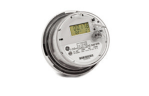
Ensure you and your neighbors’ utility meters are analog, not digital, and not wireless. Companies are replacing electric, water, and gas utility meters with digital “smart” meters that emit radiation. The pulses of radiation from smart meters are not safe. Industry states it is a “low” amount of radiation exposure. In reality, the pulses of radiation can be very high- even though they just last a millisecond- but they pulse continuously thousands of times a day. Learn more about “smart” meters here.
14. Read the Fine Print
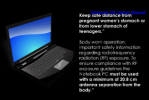
All device manufacturers advise that each wireless device should be at some distance away from human bodies and brains. For example, printers, computers, and wireless routers instruct that the distance between the device and a human body must be at least 20 cm (about 8 inches).
- Keeping these devices closer than the manufacturer’s designated distance can result in a violation of the federal government’s official radiation exposure limit. Exceeding these levels can result in your body absorbing thermal levels of microwave radiation. Such levels can heat your body and lead to sterility, burns, and brain damage. Learn more about fine print instructions for cell phones and tech devices at EHT’s Fine Print Warning Page. or EHT sample of Fine Print Warnings pdf
- Before a phone, tablet, MP3 player, etc. is placed into a pocket or bra or tucked into clothing, power the phone to OFF. If you set Airplane mode to ON and Wi-Fi to OFF and Bluetooth to OFF you will stop the wireless radiation. However, you will not stop the ELF-EMF/magnetic fields so always power phones off before placing them against your body. Always also use those settings to turn off wireless before devices are near a pregnant abdomen.
And a few other rather important things…
Laptops: Use a grounded 3 prong plug for the power supply. Yes, you may have to buy this separate when you buy your laptop. (MACs come with a two-prong adapter as well as a two-prong).
Lighting: Opt-out of fluorescents. They emit harmful blue light, create electromagnetic interference and they have mercury in them. Some halogens can create electromagnetic interference. Incandescent bulbs seem to be the safest from an electromagnetic perspective, however, they are not energy efficient.
Did you know that years ago when incandescents first came on the market, incandescents had the ability to last for far longer- but the companies created what was called the “light bulb cartel” to ensure bulbs had a shorter life span and the companies could sell more bulbs. Contact your elected representative and tell them you want power saving bulbs that are safe for our health.
Schools matter: Children are exposed to ever increasing levels of wireless in schools. Schools should have wired technology. Get resources on how to address Wi-Fi in Schools.
Reducing Magnetic Fields from Electronics and Electrical Appliances.
Scientists have also long investigated another type of electromagnetic radiation called magnetic fields. Magnetic fields are found where-ever electricity flows, from electronics to appliances to powerlines. Replicated research has linked ELF-EMF to childhood leukemia, miscarriage, ADHD, obesity, and asthma. Some quick tips on reducing exposure include:
- Do not charge phones and devices by your bedside or working space.
- Use a battery-powered alarm clock
- Use laptops and tablets on a table- not lap.
- Unplug heating blankets and waterbed heaters before getting into bed.
- Do not stare into the microwave watching food cook.
- Sleep away from all electronics, utility meters, and large appliances.
- Take magnetic field measurements, especially if you live near a powerline.
Meaningful Policy Change is Critical to Full Protection
Yes-wireless radiation is everywhere and yes, we can reduce our exposure with personal changes like these above but the reality is that we are exposed every day to more and more radiation from cell antennas that we cannot control. We need meaningful policy change to assure everyone can take these steps.
Some people cannot afford to hardwire their house and some people do not even have access to ethernet connections because they live in an apartment with wireless access only. We ask that you get involved in the movement for safe technology today.
Now with 5G and 4G densification, industry is pushing for hundreds and thousands of new antenna installations near our homes. We cannot reduce this exposure with personal changes. We need meaningful long-lasting policy change. This means talking to your elected officials. This means organizing awareness and action in your community.
Educate Yourself With In Depth Videos NOW. The Institute for Building Biology has developed an 8 Part video series with education on how to reduce EMF at home. It is a must watch for anyone interested in reducing EMF in the home. Watch certified Professional Building Biologist Oram Miller explains and demonstrate methods and practices for assessing and mitigating common household wiring errors that can affect human health.
Downloadable Fact Sheets:
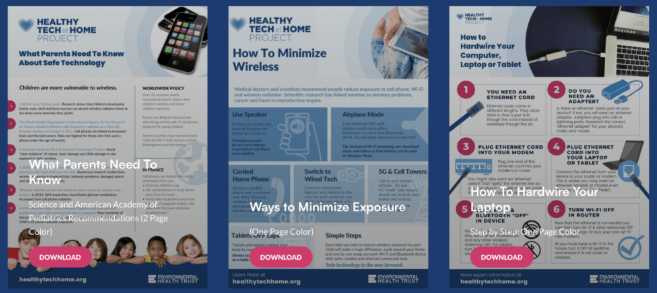
Source – Environmental Health Trust – 12 Steps to Safer Technology at Home: How To Reduce Exposure To Wireless Radiation
Note – LVsA added links to the BabySafe Project and TechSafeSchools – corrected EHT Smartmeter link
- Understanding the Risks of Electromagnetic Waves
- ICBE-EMF Calls for Urgent Action to Protect Children
- Scientific Research on Wireless Radiation Dangers
- EMR Regulations: Urgent Global Concern
- Safe Tech Protecting Children from Wireless Radiation at School
- PhoneGate
- Handystrahlung minimieren 9 Regeln für weniger Strahlung vom Smartphone
- Smart Meters Health Risks and Privacy Issues
- Fibre to the Home: Safer and Faster Internet Solutions
